
A feature that las long been asked for is under development as of March, 2024: Single Sign On.
This feature will allow users to sign in to one Da Capo website and be able to log in to other Da Capo sites (such as county sites) with one click!
SSO Enabled Websites
As of now, the following Da Capo created websites have been activated on this system:
- Da Capo Music Festivals (NYSSMA Registration)
- Da Capo Inventory
- SCMEAFestivals (Suffolk County)
- NMEA Members (Nassau County)
- Balanced Mind Conference
- Nassau NYSCAME Members
- Art Supervisors Association (ASA – Nassau County)
Other sites, including other county sites, NYSSMA-Adjudicators, and more will be added as time goes on.
Requirements for participation in Da Capo SSO
- The email address used for login must be the same on all connected sites.
- For example, if you login to one site with the email: [email protected], and another site with email: [email protected], since the email addresses are different, the system will not allow single sign-on.
- Email verification & confirmation takes place during the enrollment process.

Look for the Blue and White “Shield” icon on your county website to enroll in the new feature!
Registration Instructions
- Click the Blue and White “Shield” icon on your Da Capo created website
- Click “Add [website name] to your SSO Portfolio”
- You will receive an email message within the next two minutes that looks like this:
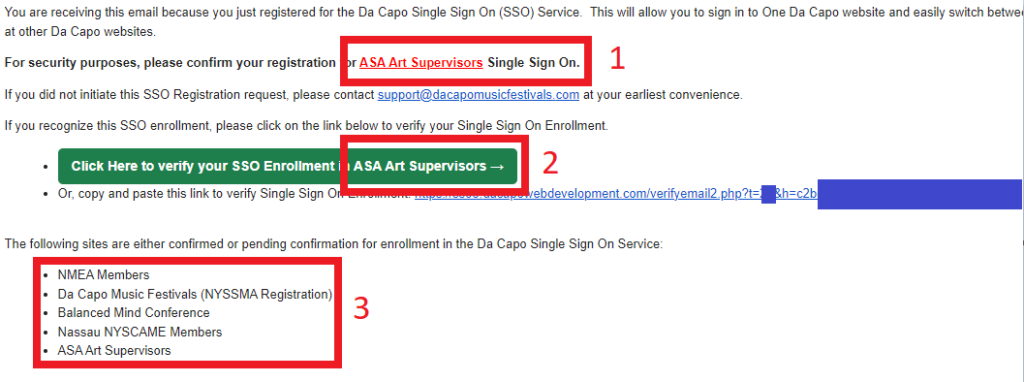
- Notice the three regions of this email.
- #1 Ensure that you signed up for the particular site that is shown.
- #2 Same!
- #3 Ensure that you registered for Single Sign On for each of the sites in that list
- Click the confirmation link or Copy and Paste the link into your browser, and your registration will be complete.
- Complete this process for each of your SSO enabled accounts (list is above).
How to Use SSO
- Once you are registered for more than one site, your Blue Shield icon will look like this:
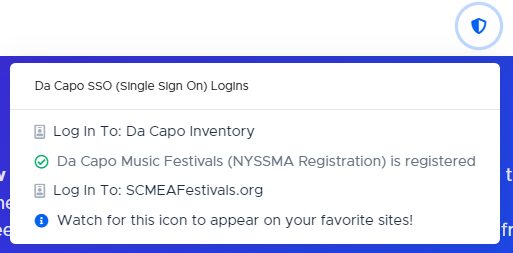
- Then, click on the title of a different site to log in to that site automatically!